
You have a hero section. Inside it is a subtitle. You want it styled a specific way, so you sit down and write the class name by hand, something like hero__subtitle .
Then you do the same for the heading, the button, the eyebrow text, and every other element on the page.
That habit comes straight from BEM (Block Element Modifier), and BEM exists to solve one thing: keeping your styles reusable and predictable across a site.
Here is the part most people miss. Bricks Builder already solves that exact problem, and it solves it better than a naming convention ever could.
If you are still writing a BEM class for every element, you are doing by hand what the builder does for you automatically.
None of this means BEM is wrong. It means there is a better tool for the job sitting inside Bricks, and a real question from the community shows exactly why.
The question that started this
A member of the Bricks Community, Joseph Sullivan, posted the exact scenario this article is about.
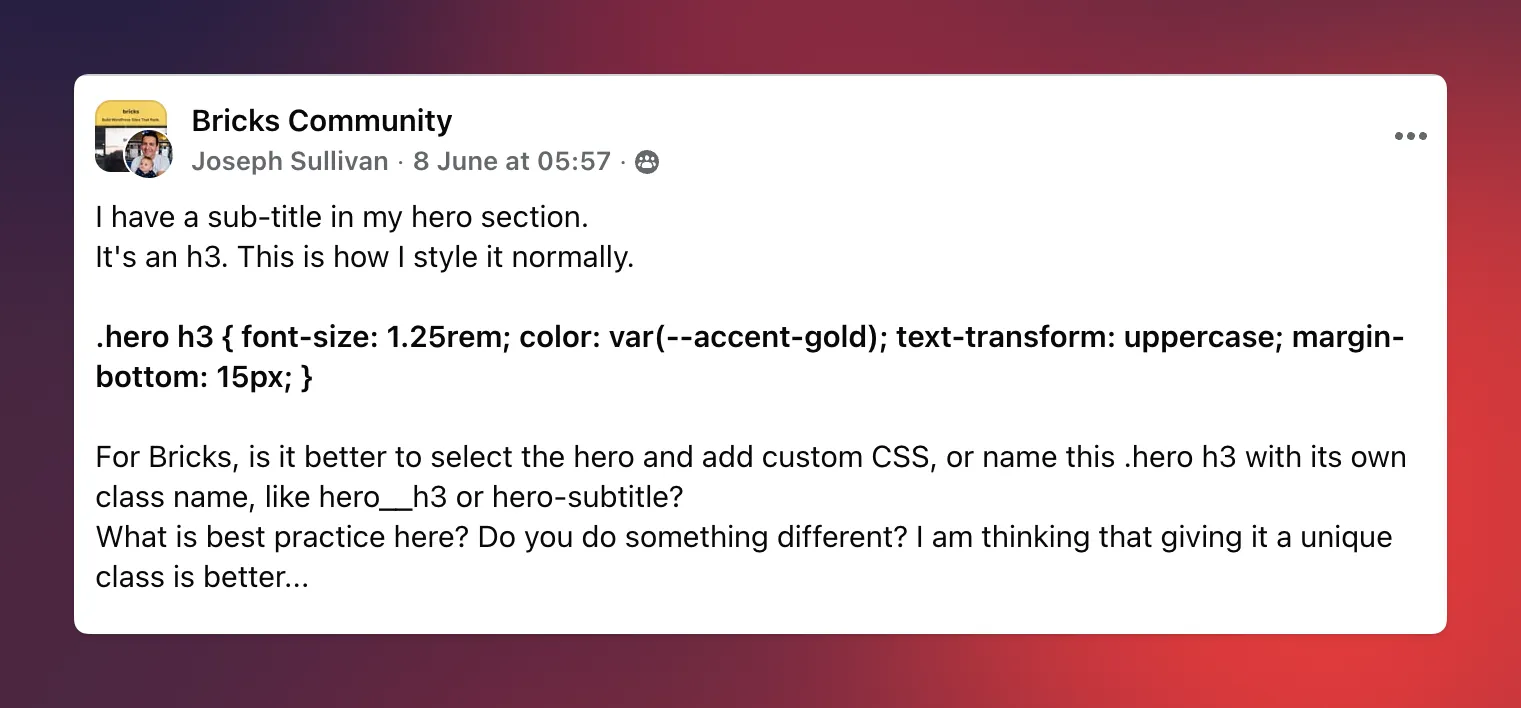
He had a subtitle in his hero section. It was an h3, styled like this:
.hero h3 {
  font-size: 1.25rem;
  color: var(--accent-gold);
  text-transform: uppercase;
  margin-bottom: 15px;
}
His question was simple.
For Bricks, is it better to select the hero and add custom CSS, or give this .hero h3 its own class name like hero__h3 or hero-subtitle? What is best practice? He was leaning toward giving it a unique class.
Reaching for a class here is a reasonable instinct. It is just aimed at the wrong layer of the problem.
I answered this in the thread, and what follows is the expanded version of that answer.
Why hero__h3 breaks BEM's own rule
Start with the naming itself, because there is a trap in it.
hero__h3 ties the class name to the HTML tag, not to what the element is for.
That defeats the whole point of BEM: to name the role, not the markup.
Picture the normal course of a project. Six months from now, you change that subtitle from an h3 to an h4. It may be an accessibility fix or the heading order shifted. Completely routine.
Now your class name is a lie. You are either renaming hero__h3 everywhere it appears, or you leave a class called hero__h3 sitting on an h4, quietly confusing the next person who opens the file, which might be you.
hero__subtitle fixes that one problem. It describes the element's purpose, not the tag it uses or how it looks today. If you are going to write a class by hand, that is the correct way to do it.
But naming it correctly still leaves the bigger problem completely untouched.
The real cost of BEM was never going to solve
Say your name perfectly. hero__subtitle, clean and role-based. You still have to:
Keep every hero on the site in sync by hand
Remember which pages use which version of the hero
Track down every single instance of that class when the design changes
That is the actual work, and a naming convention does nothing for any of it. BEM keeps your CSS organized. It does not keep your site organized. Those are two different jobs.
There is a second, quieter problem hiding in the original CSS.
.hero h3 targets any h3 anywhere inside the hero. Add a second h3 to that section later, for any reason, and it will inherit the subtitle styling whether you want it to or not. Descendant selectors like this are convenient right up until they are not.
So both options on the table, the raw .hero h3 selector and the hand-named class, leave you managing the same thing manually. That is the part Bricks can take entirely off your plate.
The better fix: Turn the hero into a Component
Instead of managing this with class names, turn the hero section into a Component. This is the exact advice I gave Joseph in the thread. Here is what it replaces.
Need a different hero on some pages? Use Component Variants instead of duplicating the entire section and manually editing classes. One Component, several versions.
Need room to add extra elements on certain pages? Use Component Slots so you can drop in additional content without forking the Component or breaking it.
Want to style everything from one place? Change it once inside the Component, and every instance across the site updates. No hunting for every
hero__subtitleon every page.Prefer native styling over CSS? Reach for Brick's built-in controls first. This is the key move for Joseph's exact case, so look closely at his CSS again:
font-size: 1.25remis the Typography font size controlcolor: var(--accent-gold)is the Typography color, pulled straight from his global color palettetext-transform: uppercase isthe Typography transform controlmargin-bottom: 15pxis the Spacing margin control
Every single line of that CSS has a native control in Bricks.
Which means Joseph does not need custom CSS for this at all, nor does he need to invent a class name for it.
He needs to style the subtitle using the controls the builder already provides, within a Component.
Still need custom CSS for something the native controls cannot reach? Add it directly inside the Component, scoped to that Component only. Not a global .hero h3 rule that might accidentally match something else six months from now.
Reusing that same custom CSS across several unrelated Components? That is the moment it earns a real utility class. Not a second before.
Look at what quietly disappeared from that list. There is no step where you invent and maintain a BEM name for every element. The Component does that job.
Exactly what to do with the subtitle in the question
If you want the short, do-this-now version for Joseph's hero, here it is in order:
Select the hero section and turn it into a Component, assuming you expect variations of this hero elsewhere on the site.
Style the subtitle with Brick's built-in typography controls first, not custom CSS. All four of his properties are covered.
Pull the color from your global color palette token instead of hard-coding it, so a brand change updates everything at once.
If there is one specific style the native controls truly cannot reach, add scoped custom CSS inside the Component.
Only promote that CSS to a global utility class once you are repeating it on a second, unrelated Component.
That is the whole workflow. No class name to maintain, no fragile descendant selector, no syncing heroes by hand.
Want to actually build these?
Knowing you should use Components and knowing how to build a solid one are two different things.
Variants, Slots, and Nested Components each have their own approach, and the gap between a Component that saves you time and one that fights you lives in the details.
That is exactly what I am putting together in my course, Learn Bricks Builder Components: Build 5 Real-World Components.
It starts from what Components actually are, walks through building your first Class Component from scratch, then goes deep on Slots, Variants, and Nested Components, and finishes with 5 complete, real-world Components you can drop straight into a client project.
It is in progress now (the first component is ready to watch), and I am actively working on it.
FAQs
Is BEM naming ever still useful in Bricks Builder?
Yes. If you do write a class by hand, name it by purpose, like hero__subtitle, never by tag or appearance, like hero__h3. But for anything reused across a site, a Component with Variants and Slots will always do more of the work than a naming convention can.
When should I use a global utility class instead of scoping CSS to a Component?
Scope it to the Component when the style belongs to that one element, even if that element shows up in several places on the page. Only promote it to a global class once the same style is being reused across multiple, unrelated Components.
Do I still need custom CSS at all in Bricks?
Often less than you think. As Joseph's example shows, font size, color, text transform, and spacing are all native controls. Save custom CSS for the specific things the built-in controls cannot reach, and scope it to the Component when you do.